Nexus Virtual Device Contexts (VDCs)
- vitualize physical hardware (like contexts in ASA)
- also vitualize control plane protocols. Separate control plane per VDC (vlan 10 in VDC 1 is not vlan 10 in VDC 2)
Each VDC has its own:
- Management plane
- Control plane
- Data plane
Why use VDC:
- multiple logical roles (Core & Distribution on the same box)
- VDCs as a managed service to customers
- lab enviroment for later production use
- some features can not co-exist in the same VDC (OTV and SVIs)
VDC limitations:
- SUP 1 - 4 VDCs per chassis
- SUP 2 - 4+1 VDCs per chassis (+1 is a management VDC)
- SUP 2E - 8+1 VDCs per chassis (+1 is a management VDC)
- note: No internal communication between VDCs - only physical cable
Default VDC 1 - always exists and can not be removed, used to manage other VDCs
Default VDC 1 can be used for normal data plane but recommended to be for management of chassis only
conf t
vdc N7K2-2
allocate interface e1/9
NX-OS check port group and allocate all port from this group automatically (ports are sharing the same ASIC). If you allocate one port from the group, you need to allocate all other ports from that group too. will add all ports from the port group
- Use the “switchto” command to change the VDC and inital setup
- Use the “switchback” command to change into the ADMIN VDC
switchto vdc N7K2-2
switchback
By default, when VDC is created, the hostname creed is

VDC User Rights:
- vdc-admin - all r/w access to only that VDC
- vdc-operator - read only access to only that VDC
- vdc-admin & vdc-operator cannot switchback
Default VDC users inherit read or r/w in non-default VDC:
- network-admin
- netowrk-operator
VDC High Availability (HA) options:
- restart VDC
- bringdown VDC
- reload SUP
- switchover to standby SUP
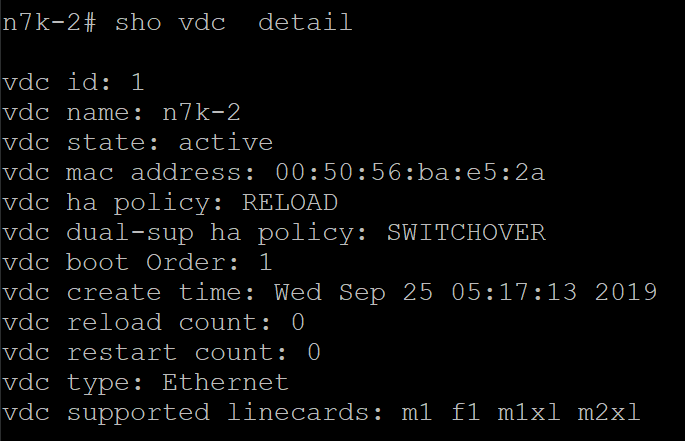
The ha-policy is under “show vdc detail” command: